Linear Regression and Gradient Descent
[ Last Updated: 2024-06-07 ]
I used to have this illusion that machine learning's linear regression started with the Method of Least Squares. Little did I know, there is an algorithm as "brute-force" as Gradient Descent for finding local minima. It truly is the era of the GPU.
Understanding the concept
Gradient Descent
Unlike traditional algebraic methods for fitting curves, Gradient Descent allows us to find local minima through iteration (note: it finds a local minimum, not necessarily the global one).
The idea is simple: start from any arbitrary value and continuously iterate the parameters and so that the Cost Function keeps decreasing until it levels off.
The iteration formula is:
Where:
- : The parameter to be optimized (can be a vector).
- : The Learning Rate, which controls the step size. If is too large, the algorithm might overshoot the minimum, causing the cost function to oscillate or even diverge. If is too small, it will require too many iterations to converge.
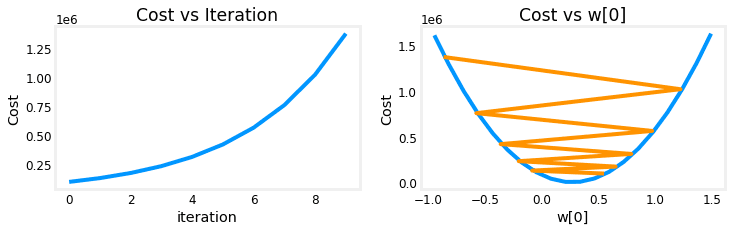
A recommended approach for tuning is to start at 0.01 and adjust by factors of 3 (e.g., 0.001, 0.003, 0.01, 0.03, 0.1...).
- : The gradient (partial derivative) of the cost function with respect to . This represents the slope. As we approach the minimum, the slope nears 0, making the updates smaller until stabilizes.
For a simple linear regression , the cost function is the Mean Squared Error (MSE):
To implement gradient descent, we calculate the partial derivatives:
The parameters are updated simultaneously:
Vectorization and Parallel Computing
In practice, numpy provides vectorization to handle matrix operations. This streamlines code and leverages CPU parallel computing, which is significantly faster than traditional loops for machine learning tasks.
import numpy as np
import time

n, m = 40, 100000
x = np.random.rand(m, n)
w = np.random.rand(n)
b = np.random.rand(m)

# NumPy Vectorized approach
start = time.time()
y_numpy = np.dot(x, w) + b
print(f"NumPy dot time: {time.time() - start:.5f}s")

# Traditional loop approach
start = time.time()
y_trad = np.zeros(m)
for i in range(m):
    for j in range(n):
        y_trad[i] += w[j] * x[i, j]
    y_trad[i] += b[i]
print(f"Traditional loop time: {time.time() - start:.5f}s")
The performance gap is massive: for 100k data points, NumPy is nearly instantaneous, while loops can take several seconds.
Practical Case: Simple House Price Regression
This week I attempted to build a linear regression model using numpy and pandas applied to a London housing dataset from Kaggle.
Data Import and Filtering
Python
x_origin = df['Area in sq ft'].to_numpy()
y_origin = df['Price'].to_numpy()
m = x_origin.shape[0] # 3480 samples
Initial scatter plot observation:
The data shows a "trumpet" shape, indicating heterogeneity. To make the regression more targeted, I filtered for "Flat/Apartment" types in the South West (SW) London area.
Python
# Filtering for flats in SW postal codes
flat_df = df[(df['House Type'] == 'Flat / Apartment') & (df['Postal Code'].str.startswith('SW'))]
x_flat = flat_df['Area in sq ft'].to_numpy()
y_flat = flat_df['Price'].to_numpy() # 660 samples
Data Standardization
Since price and area have vastly different scales, we use Z-score Normalization:
This centers the data at 0 with a standard deviation of 1. Note: This does not force the data into a normal distribution; it simply scales the distances.
Python
def z_score(data):
    return (data - np.mean(data, axis=0)) / np.std(data, axis=0)

x_train = z_score(x_flat)
y_train = z_score(y_flat)
Implementing Gradient Descent
Python
def compute_cost(x, y, w, b):
    m = x.shape[0]
    f = w * x + b
    return np.sum((f - y)**2) / (2 * m)

def compute_gradient(x, y, w, b):
    m = x.shape[0]
    f = x * w + b
    err = f - y
    dj_dw = np.dot(err, x) / m
    dj_db = np.sum(err) / m
    return dj_dw, dj_db

def gradient_descent(x, y, w_in, b_in, alpha, num_iters):
    w, b = w_in, b_in
    for i in range(num_iters):
        dw, db = compute_gradient(x, y, w, b)
        w -= alpha * dw
        b -= alpha * db
        if i % 500 == 0:
            print(f"Iteration {i}: Cost {compute_cost(x, y, w, b):.6f}")
    return w, b
After roughly 2000 iterations with , the cost stabilizes.
Results: w = 0.8058, b ≈ 0.
Higher-Order Variables: Polynomial Regression
Straight lines are sometimes unsatisfying. We can introduce higher-order features like , or to fit a curve.
Python
# Feature Engineering: Adding polynomial features
x_flat_poly = np.c_[x_flat, x_flat**2, x_flat**3, np.sqrt(x_flat)]
x_train = z_score(x_flat_poly)
Testing different combinations:
| Model ID | Specifications | Cost |
|---|---|---|
| 01. Cubic-Square-Sqrt | 0.15511 | |
| 02. Square | 0.15507 | |
| 03. Cubic-Square | 0.15481 |
Visually, the cubic curve (Model 03) provides the lowest cost, but it's important not to over-rely on cost values alone as it can lead to overfitting.
Honks
Finally started my first machine learning log! It's much faster to look at source code than theory books. This is exactly why I'm not jumping straight into scikit-learn yet—I want to understand the mechanics first.
— Untitled Penguin
2024/06/08 15:11